
Please ensure your photo meets the following requirements:
-
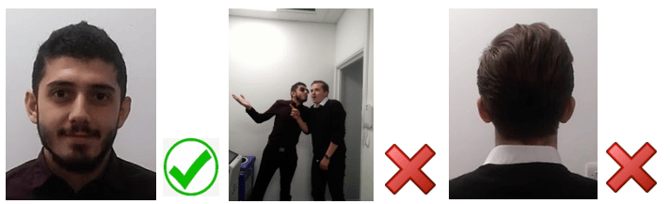
Use a passport style photo
-
Look directly at the camera with your full face clearly visible. A natural smile is welcome.
-
-
Choose a plain, neutral background
-
Take your photo against a plain, neutral background with minimal distractions. Avoid holiday, group or casual social photos.
-
-
Do not use filters or heavy editing
-
Schools need to be able to recognise you as you appear in person.
-
-
Upload the original, uncropped image
-
We will crop and resize the photo to fit the ID badge template.
-
-
Include your full face and shoulders
-
Make sure your full face is unobstructed and centred in the frame.
-
-
Face the camera directly
-
Avoid angled shots, side profiles, or photos taken from above or below.
-
If your photo does not meet these requirements, we may ask you to provide a replacement before your registration can be completed.
Before You Upload Your Photo
✅ Plain background
✅ Face and shoulders visible
✅ Looking directly at the camera
✅ Original, unfiltered photo
❌ Holiday photos
❌ Group photos
❌ Sunglasses or face coverings
❌ Heavy filters or edited images
❌ Cropped or angled shots